Little Suggestions #23

Closed
opened 2021-04-16 14:06:42 +00:00 by GoluLiliput · 10 comments
GoluLiliput commented 2021-04-16 14:06:42 +00:00 (Migrated from github.com)

Hello...
I wanted to suggest 2 small changes for the next update.

  1. The word chapter in the chapter list in the reader can be shifted a bit above, exactly in the mod vertically. The 'p' of 'Chapters' almost touches the name of the chapter.

  2. The search in a specific source should not view the searches from other sources. Either make this a specific setting in the setting section or include a button near search which will toggle 'search all sources'

Hello... I wanted to suggest 2 small changes for the next update. 1. The word chapter in the chapter list in the reader can be shifted a bit above, exactly in the mod vertically. The 'p' of 'Chapters' almost touches the name of the chapter. 2. The search in a specific source should not view the searches from other sources. Either make this a specific setting in the setting section or include a button near search which will toggle 'search all sources'
Koitharu commented 2021-04-16 14:11:37 +00:00 (Migrated from github.com)

2nd will be implemented, but I don't completely understand 1st(

2nd will be implemented, but I don't completely understand 1st(
GoluLiliput commented 2021-04-16 14:59:54 +00:00 (Migrated from github.com)

2nd will be implemented, but I don't completely understand 1st(

Ummm... In first I meant, in the reader page of any manga there is a small drop down arrow beside the name of the manga chapter u are currently reading. Tapping that brings up chapter list of the manga.

In that small window of chapter list, the title 'Chapters' could be little centred, shifted a little upwards so that it looks uniform. At the present state it almost touches the chapter name text below it if the list is slightly scrolled up.

Check this link: https://ibb.co/G0ksd0q

(I am sorry to bring to your notice such a small and negligible change suggestion 😟)

> 2nd will be implemented, but I don't completely understand 1st( Ummm... In first I meant, in the reader page of any manga there is a small drop down arrow beside the name of the manga chapter u are currently reading. Tapping that brings up chapter list of the manga. In that small window of chapter list, the title 'Chapters' could be little centred, shifted a little upwards so that it looks uniform. At the present state it almost touches the chapter name text below it if the list is slightly scrolled up. Check this link: https://ibb.co/G0ksd0q (I am sorry to bring to your notice such a small and negligible change suggestion 😟)
Koitharu commented 2021-04-16 16:03:38 +00:00 (Migrated from github.com)

Ok, thanks

Ok, thanks
GoluLiliput commented 2021-04-18 15:10:52 +00:00 (Migrated from github.com)

Ok, thanks

So... Umm... Can u fix that up too? 🥺🥺🥺
> Ok, thanks So... Umm... Can u fix that up too? 🥺🥺🥺
GoluLiliput commented 2021-04-18 15:14:51 +00:00 (Migrated from github.com)

Also one more bug is with the text scaling in manga description... The last words get cut off in many manga descriptions.

Check this: https://ibb.co/Ssn4fjD

Also one more bug is with the text scaling in manga description... The last words get cut off in many manga descriptions. Check this: https://ibb.co/Ssn4fjD
ztimms73 commented 2021-05-18 08:12:38 +00:00 (Migrated from github.com)

Also one more bug is with the text scaling in manga description... The last words get cut off in many manga descriptions.

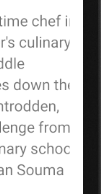
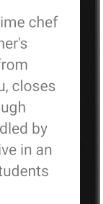
TextView for the manga description, uses the parameter android:justificationMode="inter_word", and it is only used in Android versions 8.0 and higher, since the problem on my Nexus 4 on Android 6.0 was not visible, I decided to check it in the emulator, and indeed, there is a problem. And I don't quite understand why the text doesn't align to the width, because the parameter should do just that, but it doesn't, so I think that this parameter is a bit buggy.

With android:justificationMode="inter_word"
image
Without android:justificationMode="inter_word"
image

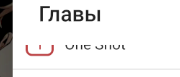
The word chapter in the chapter list in the reader can be shifted a bit above, exactly in the mod vertically. The 'p' of 'Chapters' almost touches the name of the chapter.

The problem is solved by adding the parameter android:paddingTop="16dp"
image

I will try to throw a pull request to fix these problems

> Also one more bug is with the text scaling in manga description... The last words get cut off in many manga descriptions. TextView for the manga description, uses the parameter `android:justificationMode="inter_word"`, and it is only used in Android versions 8.0 and higher, since the problem on my Nexus 4 on Android 6.0 was not visible, I decided to check it in the emulator, and indeed, there is a problem. And I don't quite understand why the text doesn't align to the width, because the parameter should do just that, but it doesn't, so I think that this parameter is a bit buggy. With `android:justificationMode="inter_word"` ![image](https://user-images.githubusercontent.com/61558546/118614600-9c62e080-b7c8-11eb-80af-bd68d1912ebc.png) Without `android:justificationMode="inter_word"` ![image](https://user-images.githubusercontent.com/61558546/118614682-b13f7400-b7c8-11eb-8ee6-2e93f07bf216.png) > The word chapter in the chapter list in the reader can be shifted a bit above, exactly in the mod vertically. The 'p' of 'Chapters' almost touches the name of the chapter. The problem is solved by adding the parameter `android:paddingTop="16dp"` ![image](https://user-images.githubusercontent.com/61558546/118615663-a20cf600-b7c9-11eb-8b86-7d6cf1e7b4d3.png) I will try to throw a pull request to fix these problems
Koitharu commented 2021-05-18 08:23:48 +00:00 (Migrated from github.com)

Bug with text also exists in my Android 10 device, so I'll try to fix it or just remove the justification flag

Bug with text also exists in my Android 10 device, so I'll try to fix it or just remove the justification flag
ztimms73 commented 2021-06-27 08:24:13 +00:00 (Migrated from github.com)

So, is it necessary to close this issue already?

So, is it necessary to close this issue already?
GoluLiliput commented 2021-06-29 01:49:44 +00:00 (Migrated from github.com)

So, is it necessary to close this issue already?

Yes... All my bugs are fixed... Thank you very very very much😊😊😊😊❤️❤️❤️

> So, is it necessary to close this issue already? Yes... All my bugs are fixed... Thank you very very very much😊😊😊😊❤️❤️❤️
GoluLiliput commented 2021-06-29 01:50:33 +00:00 (Migrated from github.com)

@nv95 thank you very very much for fixing my bugs🔥🔥🔥❤️❤️

@nv95 thank you very very much for fixing my bugs🔥🔥🔥❤️❤️
Sign in to join this conversation.
1 Participants
Notifications
Due Date
No due date set.
Dependencies

No dependencies set.

Reference: KotatsuApp/Kotatsu#23